
AI Resume Builder Resume Score and Checker, Explained
Most people open an AI resume builder expecting a document — what they get first is a number. A resume score is a figure, usually out of 100, that an AI resume checker assigns after running your resume through dozens of automated checks that estimate how readable it is and how well it matches a specific job posting.

That number matters more than it sounds. Roughly 98% of large employers filter applications through an Applicant Tracking System before a human ever opens the file, and a single posting can pull in 250 or more applicants. The score built into an AI resume builder is meant to catch problems before submission — the sections below cover what the score measures, how it’s calculated, what counts as good, and how to raise it.
What a Resume Score Actually Is
A resume score is not a grade from the company you’re applying to — it’s an estimate generated by a resume checker, a tool that simulates how an ATS would parse and rank your document. The checker reads the file, extracts the text, compares it against a job description or a general best-practices template, and returns a single figure along with a breakdown of what pulled the score up or down. There is no universal formula behind that figure; every checker weighs criteria a little differently, which is why the same resume can score 72 on one tool and 88 on another.
Score vs checker vs ATS
The three terms get used interchangeably, but they describe different layers. The resume checker is the software you interact with. The resume score is its output — a compatibility estimate, in ApplyBuddy’s phrasing, of how closely your resume aligns with a role. The ATS is the real system sitting inside a company’s hiring stack that the checker is trying to approximate. Most AI resume maker platforms bundle the checker directly into the editor, so you see the score update as you edit rather than uploading a finished file to a separate site.
That built-in loop is the main advantage over a standalone checker: you write a bullet, the score moves, you know immediately whether the change helped or hurt before you ever submit an application.
Why there’s no single official score
No employer publishes an «official» ATS score, and no two ATS platforms are configured the same way. Greenhouse, Lever, and Workday each let recruiters set their own filters, required fields, and keyword weights, so the same resume can be ranked differently by each system. A resume checker’s score is a proxy — a well-informed guess based on the criteria that show up most often across real hiring workflows — not a certified pass/fail from the employer.
How an AI Resume Checker Calculates the Score
Under the hood, most checkers run the same basic pipeline an ATS uses to move a resume from «uploaded» to «shortlisted.»
The five-step scan
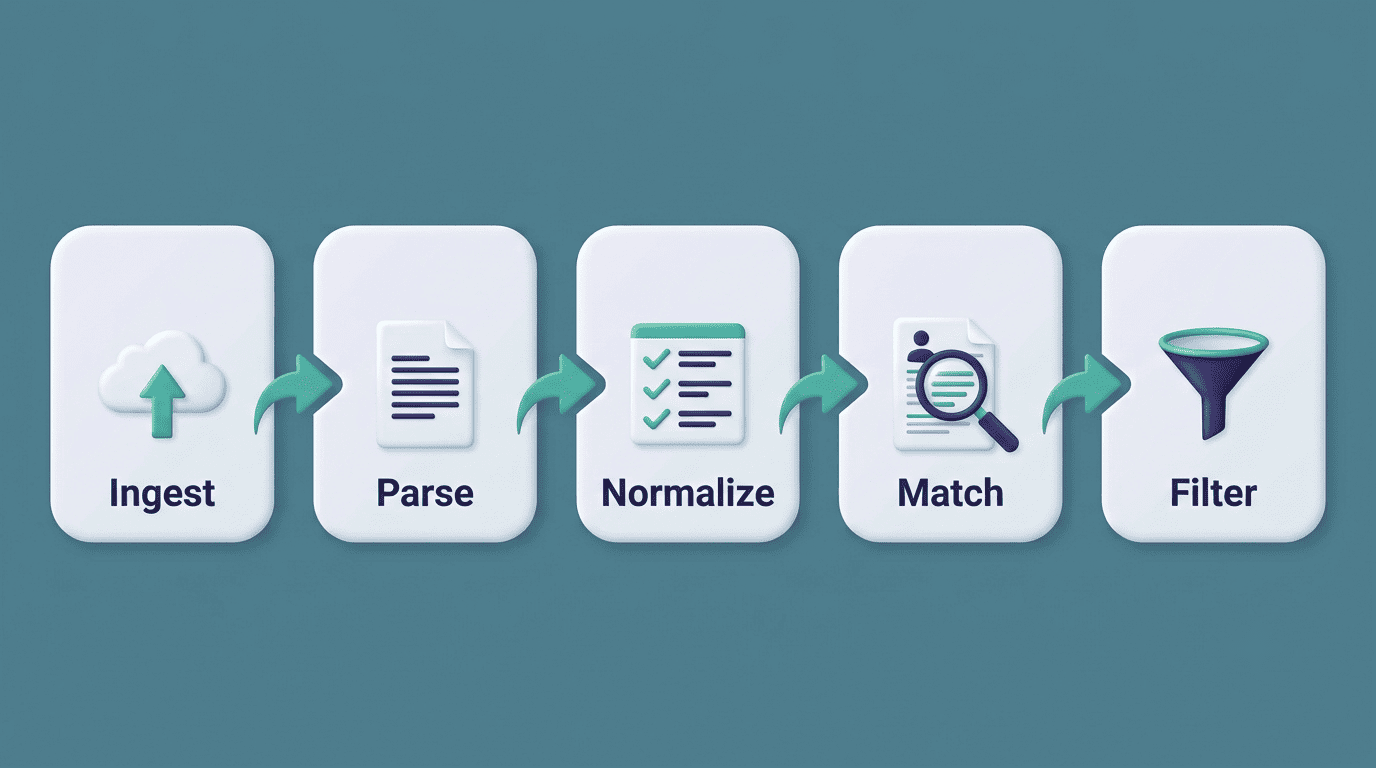
According to ApplyBuddy’s breakdown of ATS mechanics, the process typically runs in five stages:
- Ingest — the file (usually a PDF or DOCX) is uploaded and queued.
- Parse — the system extracts raw text and attempts to tag sections like experience, education, and skills.
- Normalize — job titles, dates, and terminology are standardized so they can be compared across resumes.
- Match — the parsed content is compared against the job description and ranked against other applicants.
- Filter — a shortlist is generated for the recruiter to review manually.
A resume checker runs your document through the same logic before you ever hit «apply,» which is why the score can shift dramatically after you tailor a resume to a specific posting rather than leaving it generic.
Two ways a resume fails
Failures at this stage tend to fall into two buckets. A parsing failure happens when the format itself is unreadable — multi-column layouts, tables, text boxes, or graphics that scramble the extracted text so badly the system can’t tell your job title from your job history. A matching failure happens even on a perfectly readable resume: the formatting is fine, but the content is missing the keywords, skills, or phrasing the job description expects. Either failure drags the score down, but they require completely different fixes — one is a layout problem, the other is a content problem.
What the Checker Actually Checks
The number of individual checks varies a lot by tool, which is part of why scores aren’t directly comparable across platforms.
| Checker | Reported number of checks |
|---|---|
| Resume.io | 16 |
| Kickresume | 20+ |
| Rezi | 23 (Rezi Score) |
| Enhancv | 27, across 7 categories |
| Resume Worded | 30+ (up to ~40) |
Enhancv groups its 27 checks into seven categories:
- ATS Essentials
- Resume Sections
- Content
- Job Tailoring
- Recruiter Red Flags
- Bias & Discrimination
- Seniority & Impact
Resume Worded organizes its checks into four buckets instead — Impact, Brevity, Growth, and ATS. The category names differ, but most tools converge on the same underlying signals.
The weighted factors
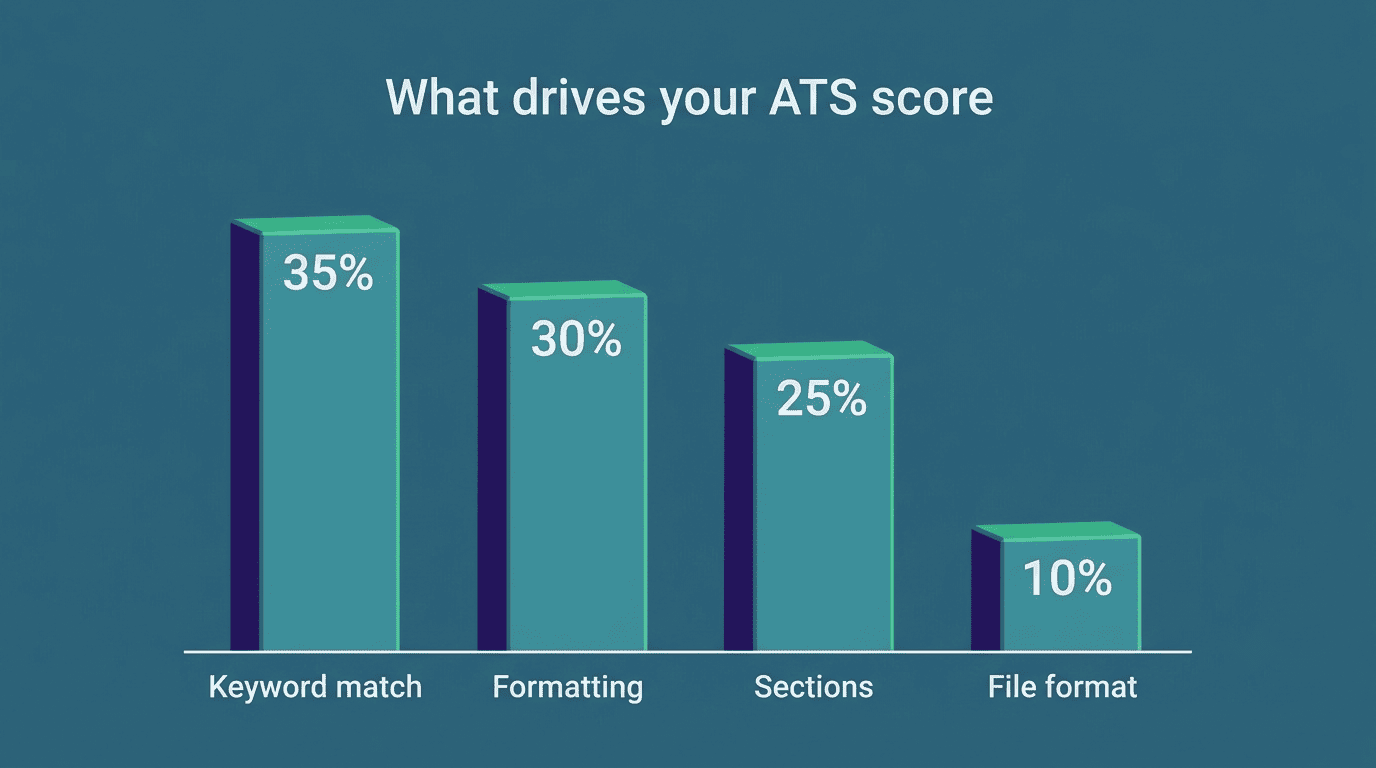
CVCraft’s analysis of ATS scoring puts rough weights on those signals, and keyword match dominates the total:
| Factor | Approximate weight |
|---|---|
| Keyword match rate | 30-40% |
| Formatting compatibility | 25-35% |
| Section completeness | 20-30% |
| File format | 5-10% |
Because keyword match carries the largest single share of the score, tailoring a resume to the specific language of a job posting typically moves the number more than any single formatting fix.
Job description tailoring matters more than a clean template. A resume built from a generic template but rewritten to mirror the posting’s exact terminology will often outscore a beautifully formatted resume that never mentions the job’s core requirements. Section structure still counts. Even a keyword-rich resume loses points if the checker can’t identify where «Experience» ends and «Education» begins. File format is the smallest factor but the easiest to get wrong. Submitting a resume as an image-based PDF or an unusual file type can zero out an otherwise strong score before the content is even evaluated.
Beyond ATS: what recruiters see
Some checkers layer a second evaluation on top of the ATS simulation. Enhancv and Resume Worded both flag things an Applicant Tracking System doesn’t actually read, but a human recruiter notices instantly:
- Quantified impact versus vague claims
- Weak opener verbs, such as «Assisted» or «Helped»
- Inconsistent career progression
- Other recruiter red flags, like unexplained gaps
A resume can clear the ATS threshold and still lose the recruiter’s attention within the first ten seconds if this second layer is ignored.
As the Society for Human Resource Management has noted, the software behind this process has grown well past simple keyword storage.
Today’s ATS goes beyond resume tracking to include sourcing, marketing, interviewing, candidate relationship management, analytics and onboarding functions—a complete toolkit of tasks that recruiters require for success.
Society for Human Resource Management (SHRM)
What Counts as a Good Score
Score bands vary slightly by tool, but they cluster around the same rough thresholds.
The score bands
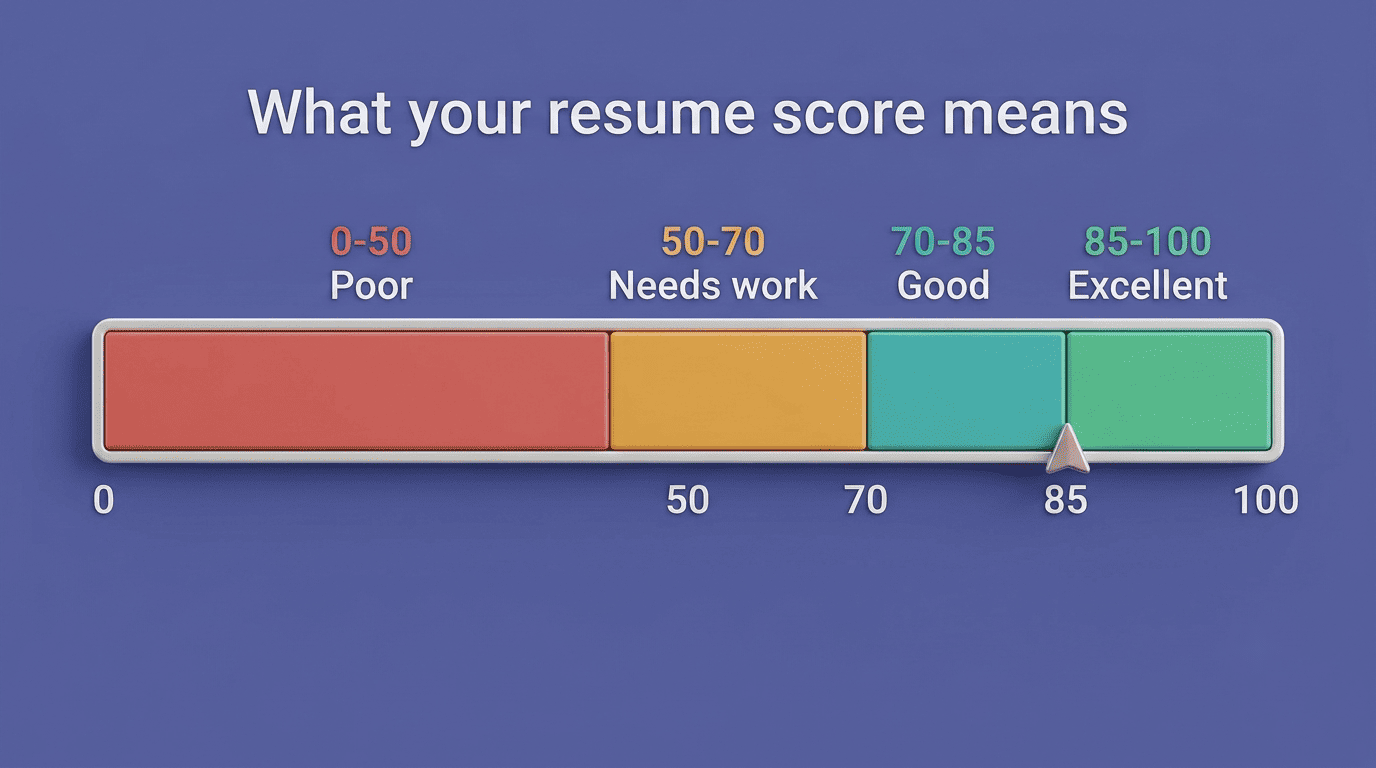
Most checkers group results into four bands: 0-50 is treated as a near-automatic rejection, 50-70 signals the resume needs real work, 70-85 is considered good and competitive enough to clear most filters, and 85-100 is excellent. Resume.io describes anything at 80% or above as «headed for an interview,» and its checker tells users that hitting 90% roughly doubles those interview chances. Resume Worded sets its own bar a little higher, treating 85+ as good and 90+ as ideal.
Aim high, but don’t stuff keywords
The consistent target across tools is a score somewhere in the 85-95 range, achieved through genuine alignment with the job description rather than repeating keywords until they no longer read naturally — a tactic most modern checkers detect and penalize. Target scores also shift by field: keyword-heavy, technical postings — tech, engineering, finance — tend to demand a higher bar (often 80+) than roles with less standardized terminology, since the checker has more exact terms to match against. A resume that clears the general «good» threshold isn’t automatically competitive in every industry, so it’s worth checking whether a target field skews stricter.
How to Raise Your Resume Score
Once you know what’s being measured, most of the fixes are mechanical rather than a full rewrite.
Five high-impact fixes
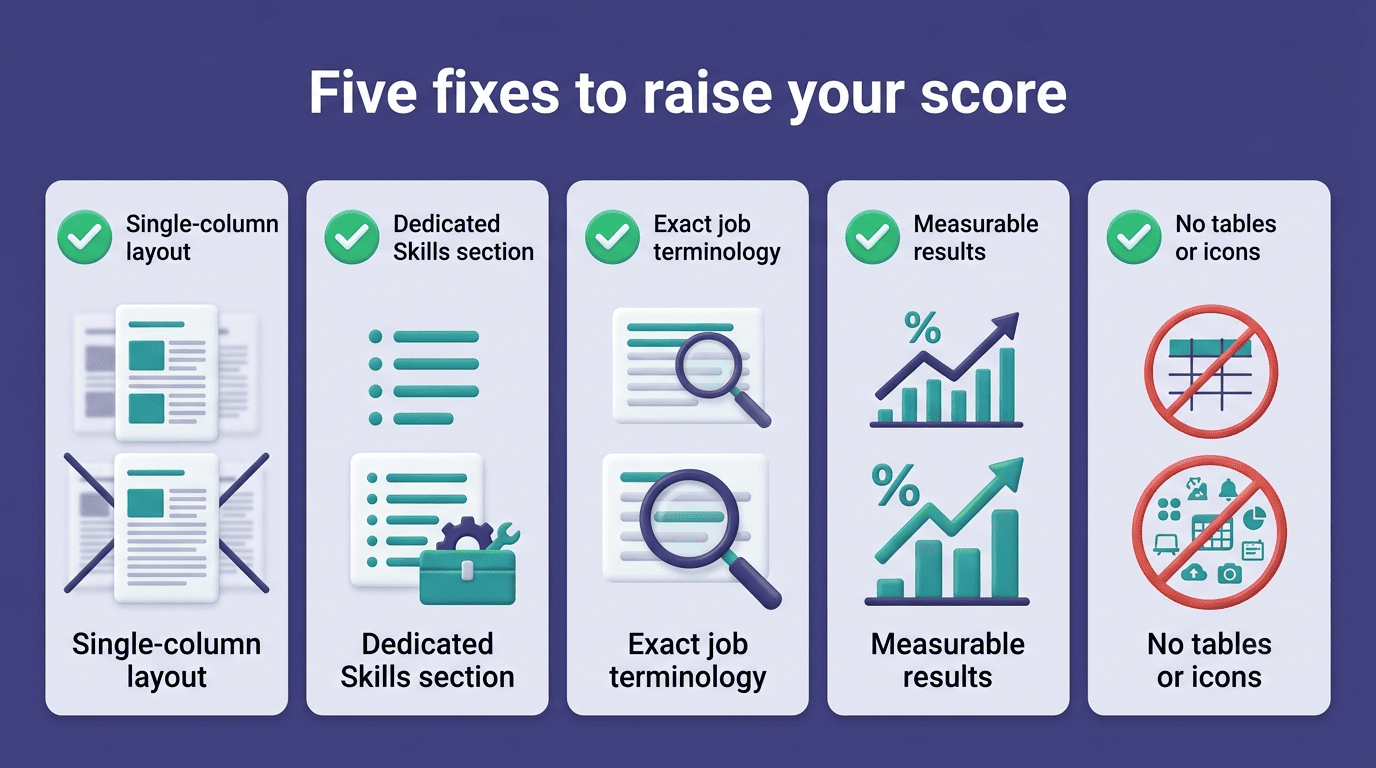
ApplyBuddy’s guidance narrows the list down to five changes that move the score the most:
- Switch to a single-column layout — sidebars and multi-column designs are the most common cause of parsing failures.
- Add a dedicated Skills section that mirrors the terms used in the job posting.
- Match the job description’s exact terminology instead of a close synonym.
- Replace vague duties with measurable outcomes, such as «increased sales by 25%» instead of «responsible for sales.»
- Remove tables, icons, and header/footer text that carry information the parser can’t reliably extract.
Check before you send, inside the builder
The advantage of running this process inside an AI resume maker rather than juggling a separate export-and-upload checker is that the score updates as you apply each fix, so you can see exactly which change moved the number. Build the resume, check the score, adjust the weak sections, and check again — all without leaving the editor or switching between tools.
For anyone applying to multiple roles, that loop is worth repeating for every posting: pasting in a new job description and re-running the check through an online AI resume builder takes a couple of minutes and directly targets the factor — keyword match — that carries the most weight in the score.