Do AI Resume Builders Pass ATS? How to Make an ATS-Friendly Resume in 2026
Short answer: yes — a resume from a good AI resume builder passes the ATS, because no major applicant tracking system checks who wrote it. What decides your fate is whether the file parses cleanly and mirrors the job’s keywords, according to CareerOneStop, the resume-guidance resource sponsored by the U.S. Department of Labor.

Resumes get rejected for two reasons, and neither one is «an AI wrote this»: bad formatting the parser can’t read, and generic content with none of the job’s keywords. The rest of this guide covers exactly what an Applicant Tracking System does with your file and how to build a resume — with or without AI — that survives the process.
Do AI Resume Builders Actually Pass the ATS?
Applicant Tracking Systems don’t run an «AI or human» test on incoming resumes. They run a structure test and a keyword test. That distinction matters more than most job seekers realize, because it changes what you should actually worry about.
The verdict: the ATS does not care who wrote it
No major ATS — not Workday, not iCIMS, not Taleo, not Greenhouse, not Lever — natively flags AI-generated text. These systems parse structure, extract keywords, and calculate a match score; they were never built to judge authorship. Even purpose-built AI detectors are shaky ground: OpenAI shut down its own AI-text classifier in July 2023 after it reached only 26% accuracy at identifying AI-written text. A Stanford study found detection tools produced a 61.3% false-positive rate when evaluating essays written by non-native English speakers. If dedicated detectors can’t reliably call AI authorship, a hiring pipeline built for parsing resumes certainly isn’t doing it as a side effect.
So why do people think AI resumes get rejected?
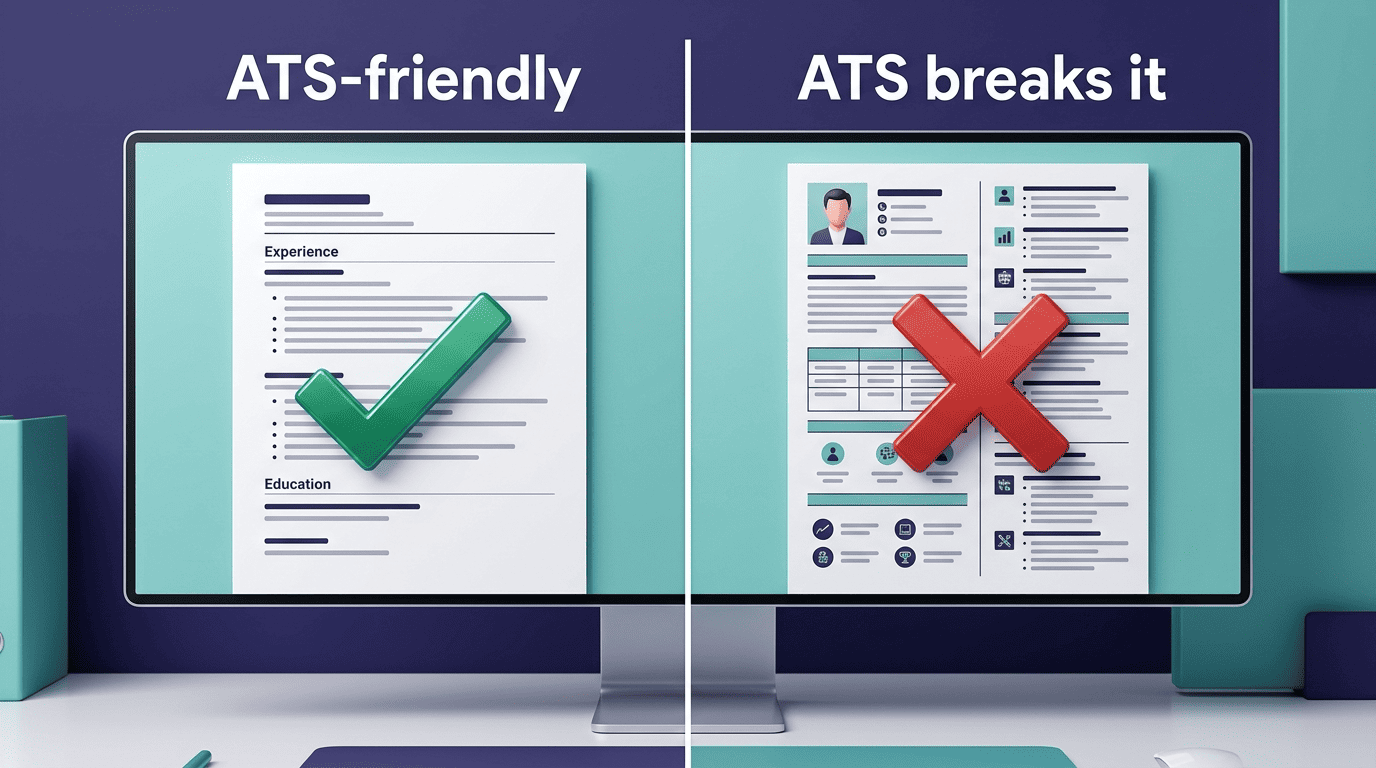
The confusion comes from correlation, not causation. People use an AI resume builder, get rejected, and blame the AI. In reality, rejection almost always traces back to one of two things: a layout the parser can’t read (tables, multi-column grids, graphics, icons) or generic content that never mentions the job’s actual requirements. An AI resume builder passes the ATS when it outputs a single-column, text-based file tailored to the role — the tool isn’t the problem, the template and the content are.
How an ATS Reads Your Resume (Parse to Rank)
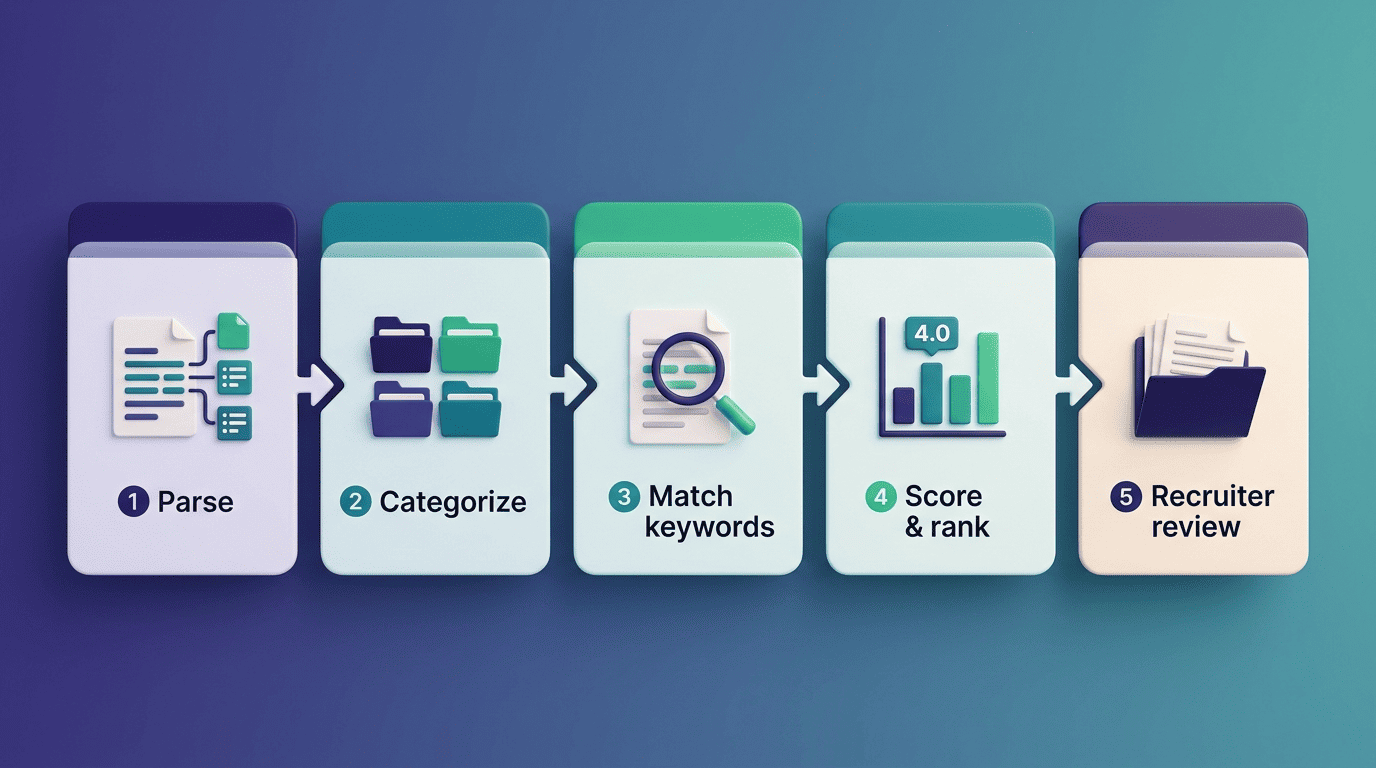
Before a recruiter ever opens your file, it goes through a pipeline that has nothing to do with human judgment. Understanding each stage tells you exactly where a resume can fail before a person sees it.
The parsing-to-ranking pipeline
- Parsing — the ATS extracts your resume’s raw text into structured fields (name, contact, work history, education, skills).
- Categorization — it sorts that text under recognized section headers.
- Indexing and matching — it compares your parsed content against the job description’s keywords and requirements.
- Scoring and ranking — it assigns a match score and ranks you against other applicants.
- Recruiter review — a human scans the top-ranked resumes, typically spending around six to seven seconds on an initial look.
A large share of resumes never reach a recruiter’s eyes because they stumble at the parsing stage first — the widely repeated «70-75% auto-rejected» figure traces back to an uncited 2012 vendor claim with no published methodology, but the underlying point holds up: formatting and keyword mismatches, not writing style, are what quietly disqualify most applications before a person opens the file.
How common is ATS — and how parsing breaks
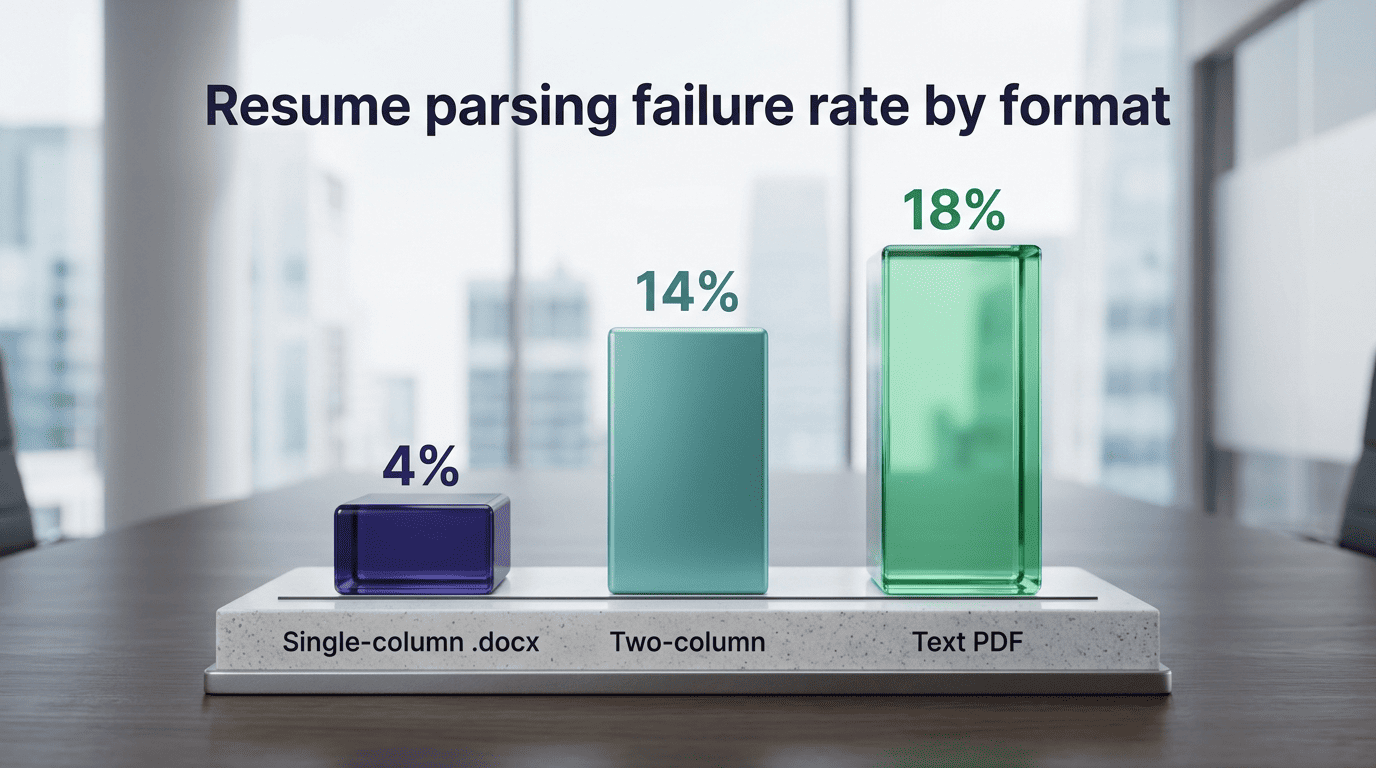
Between 97.8% and 99% of Fortune 500 companies use an ATS, and roughly 70% of large employers overall rely on one to screen applications. Format is what makes or breaks parsing accuracy: standard .docx files fail to parse correctly around 4% of the time, PDFs fail closer to 18%, and single-column layouts parse with around 93% accuracy versus roughly 86% for two-column layouts — meaning a two-column resume is roughly twice as likely to come out of the parser with a formatting error, per a 2025 analysis of 1,000 rejected resumes by EDLIGO. That gap is the whole game — a free AI resume builder that exports a clean, single-column text file avoids the failure mode that sinks most applicants before a human is involved.
| File / layout type | Approximate parsing failure rate |
|---|---|
| Single-column .docx | ~4% |
| Text-based PDF | ~18% |
| Two-column layout | ~14% (about double the single-column rate) |
What Makes a Resume ATS-Friendly: Format Rules
Format is the single biggest lever you control, and it’s almost entirely mechanical — there’s no creative judgment call that should override it.
Layout, headings, fonts
Layout is where most ATS-friendly resumes are won or lost, and the rules are straightforward once you know what a parser expects to see:
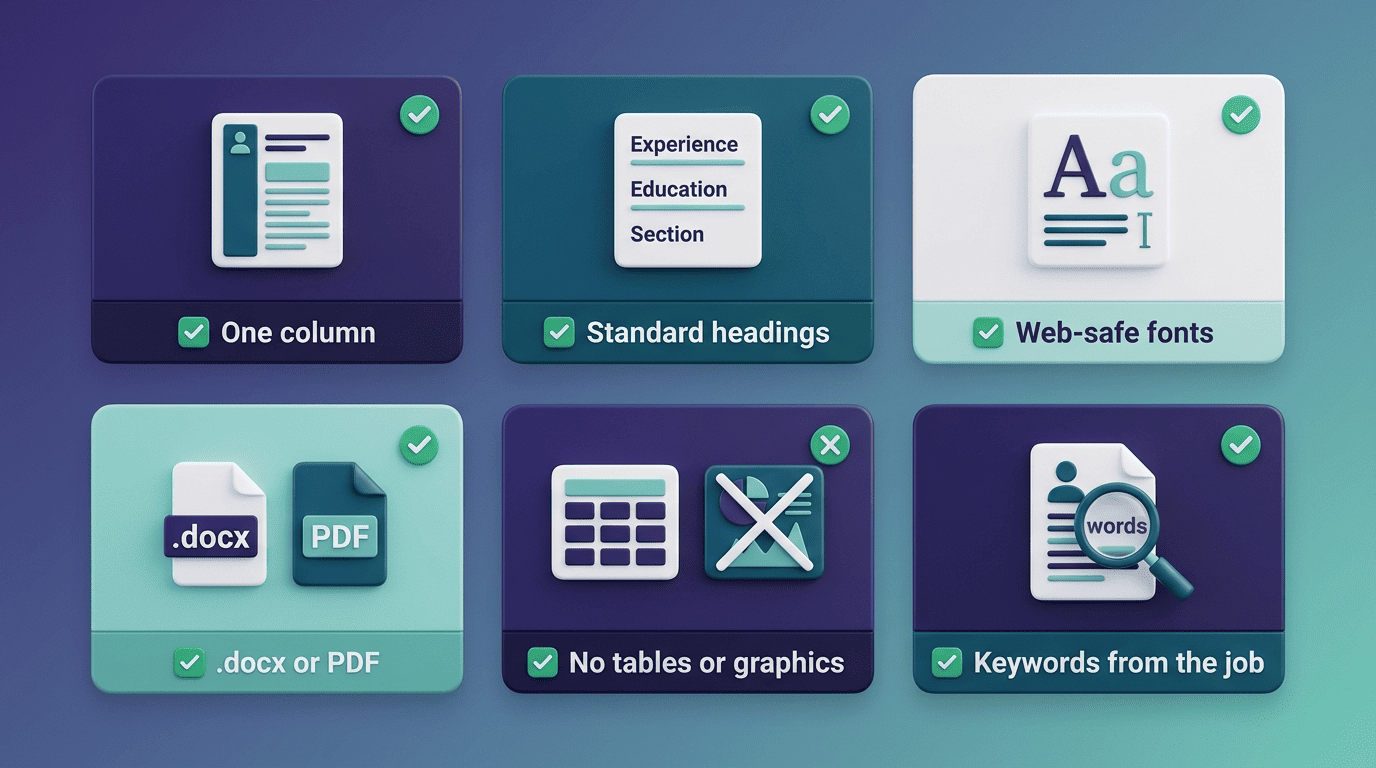
- One column, no exceptions. Skip tables, text boxes, embedded graphics, and icons — parsers frequently read these as blank space or scramble the reading order entirely.
- Standard section headings. Stick to labels the ATS is trained to recognize: Work Experience, Education, Skills, Summary.
- Web-safe fonts only. Arial, Calibri, Georgia, Helvetica, or Times New Roman, at 10-12pt for body text and 14-16pt for headings.
- Roomy margins. Roughly 1-inch margins, with 0.5 inches as the absolute minimum.
- Contact details in the body. Not in a header or footer — some parsers skip those entirely, and studies of ATS parsing have found contact information gets dropped in around 25% of cases when it’s placed there.
Bullets, length, and what to strip
Use simple bullet characters — a solid or hollow circle, a square, or a dash. Avoid checkmarks, arrows, and emoji; some parsers render them as garbled characters or ignore the line entirely. Keep the resume to one or two pages depending on experience level, and strip out photos, sidebars, columns, and decorative charts. None of that content helps a parser, and it’s often what breaks one.
Which File Format Wins: .docx or PDF?
The format question sounds trivial, but it’s one of the fastest ways to sabotage an otherwise strong resume.
If the job posting doesn’t specify a file type, .doc or .docx is the safer default. Most ATS platforms were built around Word documents first, so .docx has the most consistent parsing track record across systems. A text-based PDF — one generated from a document, not scanned or exported as an image — also parses reliably in most modern systems.
What to avoid outright, because each one frequently returns blank or garbled fields to the parser:
- .rtf
- .pub
- .png or other image formats
- .html
- .pages
- .odt
- Any scanned or image-based PDF
| Format | ATS-safe? |
|---|---|
| .doc / .docx | Yes — safest default |
| Text-based PDF | Yes, in most modern systems |
| Scanned / image-based PDF | No |
| .rtf, .pub, .pages, .odt | No |
The safe choice and the 5-minute test
- Save a copy of your resume as plain text (or open it and select all, copy, then paste into a plain text editor like Notepad or TextEdit in plain-text mode).
- Check whether the text appears in the correct top-to-bottom, left-to-right reading order.
- Confirm no section — contact info, job titles, dates, bullet points — is missing or jumbled.
- If everything reads cleanly and in order, an ATS parser will most likely read it the same way.
- If text is missing, out of order, or merged incorrectly, rebuild the section using a simpler layout and retest.
This five-minute test catches the majority of formatting failures before you ever submit an application.
Keywords Without Stuffing: Semantic Mirroring
Passing the parsing stage gets your resume into the system. Passing the ranking stage is a separate problem, and it comes down to keyword match.
Mirror the job, don’t spam it
Pull the actual language from three to five similar job postings for the role you’re targeting, then work those terms into your resume naturally, repeating each two or three times across different sections. This is semantic mirroring: match the job posting’s exact phrasing and title where it genuinely applies to your experience — if the posting says «stakeholder management,» use that phrase rather than a rough synonym. For acronyms, spell out the full term alongside the abbreviation at least once (CRM — Customer Relationship Management, SEO, SQL), since some parsers only match one form. What doesn’t work is keyword stuffing or hiding keywords in white text: modern ML-based parsers evaluate context and relevance, not just exact-string matches, and stuffed resumes read as spam to both software and recruiters.
A well-built keyword strategy pulls language directly from the job description and weaves it into your existing bullets instead of dropping in a disconnected keyword list.
Turn Duties into Quantified Achievements
Format and keywords get you ranked. Content quality is what keeps a recruiter reading once your resume is in front of them.
Numbers beat vague verbs, every time. «Managed a team» tells a recruiter almost nothing measurable. «Managed a team of 8 engineers across 3 time zones» tells them scope, scale, and complexity in one line. The same logic applies across a resume: «Responsible for reports» becomes «Built weekly Excel reports, cutting manual reporting time 30%.» Other examples of the pattern: «+18% sales via CRM adoption» or «Led a team of 15, improving productivity 10%.» Achievement-based bullets with real numbers score higher on relevance and read as far more credible than generic duty lists, which recruiters increasingly treat as a red flag for skill inflation.
Saved 125 hours per project. Increased sales by 15%. Trained 32 new staff.
CareerOneStop, U.S. Department of Labor
How to Use an AI Resume Builder Safely
AI can speed up the writing, but the tool you choose still determines whether the output actually clears the ATS.
Pick single-column templates and tailor every time
The biggest risk with AI resume builders isn’t the writing — it’s the template. Many tools default to visually striking two-column designs with icons and sidebars, which look sharp to a human eye but parse as near-zero usable content to an ATS. Choose an AI-powered resume builder that offers ATS-tested, single-column templates by default, retailor the content for every application using the job posting’s own language, and run the finished file through an ATS resume checker (such as Jobscan or the resume.io ATS Scorer) before you submit it. That final check catches formatting or keyword gaps a quick read-through will miss.